


Google business profile optimization is not a one time setup job. Most owners treat it like one. They claim the profile, upload a logo, pick a category in thirty seconds and never open it again.
Meanwhile that profile is doing more selling than their website. It is the first thing a customer sees when they search for what you do near them: your rating, your hours, your photos and a big call button. This post covers what Google says it looks at, the one setting that matters more than anything else, and a 30 minute weekly routine that keeps the profile turning searches into calls.
Table of Contents
Quick Answer
Google business profile optimization comes down to three jobs. Pick the most specific primary category (the number one local pack factor in Whitespark’s 2026 Local Search Ranking Factors survey), fill in every field with accurate information, and keep the profile alive every week with real photos, a short update, review replies and correct hours. Google says it ranks local results on relevance, distance and prominence. You control two of the three.
Most of the weekly work is not a ranking trick. It is how you make sure the person who finds you actually picks up the phone.
Why Your Profile Does More Selling Than Your Website
Picture the search. Someone types “emergency plumber” or “dentist near me” into Google. They get a map and three businesses. A lot of people decide right there and never visit anyone’s website.
According to Google’s own help center, customers are 70 percent more likely to visit and 50 percent more likely to consider purchasing from businesses with a complete Business Profile. Google also says a complete profile makes customers 2.7 times more likely to consider a business reputable.
Those are Google’s numbers, and Google obviously wants you to fill in its product. But the direction is common sense. An empty profile looks like a business that might be closed. A full one looks like a business that answers the phone. And most of your competitors set theirs up once and forgot it. That is the opening.
What Google Says It Uses: Relevance, Distance, Prominence
Google does not publish its local algorithm. It does publish three words in its help article on local ranking.
Relevance is how well your profile matches what someone searched for. Google’s advice is plain: provide complete and detailed business info.
Distance is how far you are from the person searching. If they do not share their location, Google uses what it knows about where they are. You cannot change it, so be skeptical of anyone who promises to.
Prominence is how well known your business is. Google says directly that more reviews and positive ratings can help your local ranking.
So two of the three are yours. Relevance mostly comes from your categories and details. Prominence mostly comes from reviews. Google adds one line worth taping to your monitor: businesses with complete and accurate info are more likely to show up in local search results. Complete and accurate. Not clever.
How to Choose Your Primary and Secondary Categories

If you fix one thing today, fix this. Whitespark’s 2026 Local Search Ranking Factors survey, published November 6, 2025, asked 47 local search experts to score individual factors. Primary GBP category came out as the number one factor for the local pack. It beat the distance between the searcher and the business (number two) and keywords in the business name (number three). Additional categories ranked number eight.
Your primary category tells Google what you are. Pick the most specific one that describes your core business, the work that pays the bills and the thing customers actually search for. A nail salon should not use the generic “Salon.” A practice that mostly does injectables and laser treatments is a “Medical spa,” not a “Beauty salon.” A firm that only takes injury cases is a “Personal injury attorney,” not just “Lawyer.”
Your additional categories cover real departments or services. Google lets you add up to 9 of them, according to BrightLocal. But Google’s own guidelines say to use as few categories as possible to describe your core business, and not to use categories just as keywords. A family dentist who also offers emergency appointments can reasonably add an emergency dental category. A gym with a juice bar run by someone else should not add “Juice shop.”
BrightLocal studied this in 2023 and found that profiles with four additional categories had the best average map ranking (5.9) in its sample. That is a correlation, not a rule. Four honest categories beat nine stretches.
Here is how to pick them in 15 minutes:
- Search your main service and city on Google Maps. Write down the category shown under the name of each of the top three businesses.
- Choose the most specific primary category that is true for you. If two fit, pick the one tied to your highest value service.
- Add additional categories only for services you actually sell and want calls for.
- Recheck once a quarter.
- Treat a primary category change as a big decision. Make it once, then watch your calls for a few weeks.
One warning about the business name. Since keywords in the name rank number three, owners are tempted to rename themselves “Best Plumber Dallas 24/7.” Google’s guidelines say your name should reflect your real world name and that unnecessary information is not permitted. Competitors can report it. If you want a keyword in your name, it has to be your actual name, on your sign and your paperwork.
Google Business Profile Optimization, Field by Field
Google lists the fields it wants filled in on its “Complete your Business Profile” help page. Here are the key ones and the most common mistake.
| Profile field | What to do | Common mistake |
|---|---|---|
| Primary category | The most specific category for your core business | Picking a broad category because it sounds bigger |
| Additional categories | A few that match real services you want calls for | Filling every slot with loosely related categories |
| Business name | Your real world name, exactly as it appears on your sign | Adding cities and keywords that are not part of the name |
| Hours | Your real customer facing hours | Listing longer hours than you actually keep |
| Special hours | Holiday and temporary changes, entered weeks ahead | Showing open on a holiday when you are closed |
| Services | Every service you offer, with plain descriptions | Leaving the default list or skipping it entirely |
| Description | Who you serve, what you do, where, and why you | Stuffing keywords or pasting your mission statement |
| Photos and videos | Logo, cover photo, real work, team, location | Stock images, or no new photos for a year |
| Attributes | Every one that is true (accessibility, payments, amenities) | Ignoring them because they look minor |
| Review link | Saved on every phone and in every follow up message | Never actually sending it to customers |
| Website and booking links | Link to the page that matches the search, plus a booking link if you take appointments | Sending everyone to a slow homepage |
Pay extra attention to the website link. It is where a curious customer goes next. If that page is slow or vague, a great profile just hands the lead to the next result. Your website should match the profile: same services, same hours, same areas, more detail.
What Barely Moves Rankings, and Why You Should Do It Anyway
Here is the contrarian part. The same Whitespark survey scored the stuff most “GBP optimization” packages sell, and a lot of it ranks low for the local pack.
- Frequency of Google posts and updates: number 148.
- Quantity of photos on the profile: number 96.
- A Q&A section seeded with owner FAQs: number 142.
Now compare that with hours. “Proper Hours Set on GBP” jumped from number 85 to number 21. “Business is Open at Time of Search” sits at number five. Darren Shaw, who runs the survey, put it simply: Google wants to show people businesses that are open. He also warned against listing hours other than the ones you actually keep.
So why post and add photos every week if they barely move rankings? Because ranking gets you seen, and the profile gets you chosen. A customer comparing three roofers looks at the photos, the recent reviews and whether the owner replies. Shaw’s advice on engagement: give people content to engage with, and the algorithm will reward you. The survey also found that review signals and behavioral signals (clicks, calls, direction requests) gained the most importance this year.
Two things to avoid. The survey scored AI generated photos and videos as a negative factor with real suspension risk, and keyword stuffed posts carry suspension risk too. Real photos of real work. Plain words.
The 30 Minute Weekly Routine
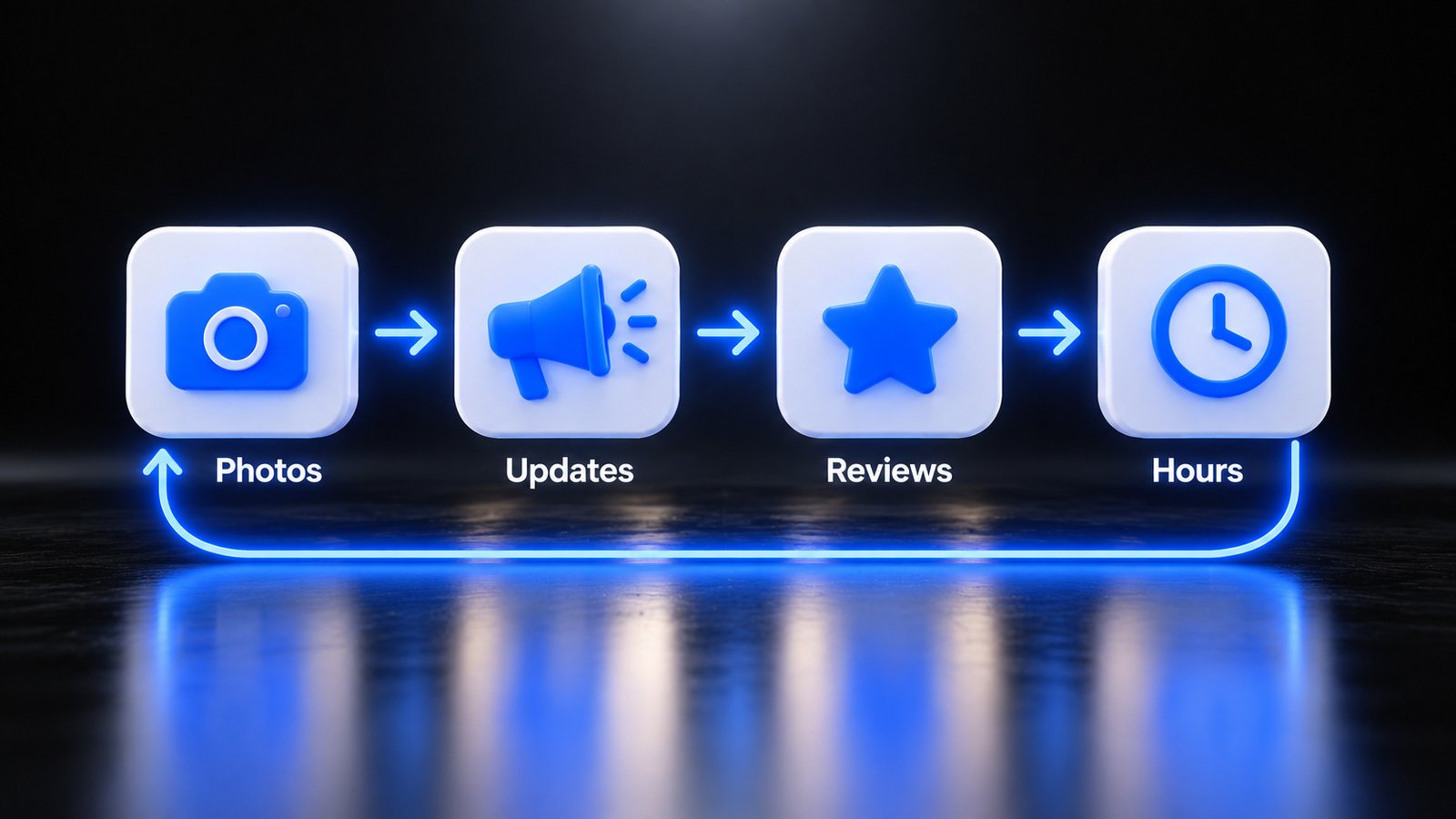
This is what separates profiles that bring in calls from profiles that just exist. Four jobs, about 30 minutes a week. Put it on one person’s calendar, or it will not happen.
Monday: photos (10 minutes). Add three to five real photos from the past week. A finished job, the team, a busy Saturday. Google’s help center tells businesses to upload photos and videos regularly. A phone photo of a real kitchen remodel beats a polished stock image every time.
Tuesday: one update (5 minutes). Post one Update, Offer or Event on your profile. Tie it to something real: a seasonal service, a finished job, holiday hours. Add a button to call or book. If you already post on social media, reuse your best post of the week here.
Every day: reviews (2 minutes a day). Ask every happy customer for a review the same day, using the review link from your profile. Then reply to every review, good and bad. According to BrightLocal’s 2025 Local Consumer Review Survey, only 4 percent of consumers say they never read online reviews, and just 7 percent say they do not expect businesses to respond. Keep replies short, specific and calm. And never offer a discount or freebie in exchange for a review. Google’s policies prohibit review incentives.
Friday: Q&A and hours (10 minutes). Check your questions and answer anything new. Note that Google shut down the Q&A API on November 3, 2025 and says it is updating the Q&A experience, so answer questions directly in your profile and put your most common answers in your description and on your website too. Then check your hours. Thanksgiving is November 27, and Christmas and New Year’s come right after. Enter special hours now, not the night before. Then confirm nobody has changed your phone number or address.
One more thing. A profile that works makes the phone ring more, including after hours and while you are on a job. If calls go to voicemail, that traffic goes to the next business on the map. Our custom AI receptionist is built to answer those calls, book appointments and pass along the details.
A Google Business Profile Checklist You Can Run This Week
The weekly routine keeps the profile alive. This one time checklist gets it right first. Block two hours and go in order.
- Confirm you own the profile. Make sure the owner account is a business email you control, not a former employee or an old agency.
- Fix your primary category. Most specific, most true, tied to your core revenue.
- Clean up categories and name. Only real services in your categories, nothing extra in your name.
- Set regular hours and special hours for every holiday through the end of the year.
- Fill in services, description and attributes. Every field that applies.
- Upload 10 real photos plus a logo and a cover photo that match your brand.
- Point your website link at the right page and add a booking link if you take appointments.
- Reply to every unanswered review, oldest first.
- Save your review link on every team phone.
Do the first five today. They cost nothing and they hit the factors that carry the most weight: categories, hours and accuracy.
Where BizWarrior Fits
BizWarrior is a young agency that helps local businesses get more clients with software and marketing that sell. A lot of that is the boring, every week work owners know matters but never have time for.
For Google Business Profile optimization that usually means fixing categories and profile data, setting up a review routine your team will actually run, keeping photos and updates going each week, and making sure your website backs up everything the profile says. If you also run Google or Meta ads, we make sure the profile and the ads tell the same story. You can see everything we do here.
Not sure where your profile stands? Talk to us. We will go through it with you and tell you plainly what to fix first.
Frequently Asked Questions
What is Google Business Profile optimization?
It is the work of making your free Google Business Profile complete, accurate and active so you show up in local results and get chosen. That means the right categories, correct hours, full services and description, real photos, and a habit of asking for and replying to reviews. Google says complete and accurate profiles are more likely to appear in local search.
What is the most important Google Business Profile ranking factor?
According to Whitespark’s 2026 Local Search Ranking Factors survey, published November 6, 2025, the primary GBP category is the number one factor for the local pack. Distance between the searcher and the business ranked second and keywords in the business name ranked third. Only use a keyword in your name if it is part of your real business name.
How many categories should I use on my Google Business Profile?
Google allows one primary category and up to 9 additional categories, but its guidelines say to use as few as possible to describe your core business. A 2023 BrightLocal study found profiles with four additional categories had the best average map ranking in its sample. Add categories only for real services you want calls for.
How often should I post on my Google Business Profile?
Once a week is a realistic target for most local businesses. In Whitespark’s 2026 survey, post frequency ranked low as a direct local pack factor, so posting daily will not rocket you up the map. Weekly updates still matter because customers compare profiles before they call, and recent activity shows your business is open and paying attention.
Do photos help my Google Business Profile?
Yes, mostly by helping customers choose you. Google’s help center tells businesses to upload photos and videos regularly, and photo factors appear in Whitespark’s 2026 survey, though photo quantity ranked low for rankings. Use real photos of your work, team and location. The survey scored AI generated photos as a negative factor with suspension risk, so skip them.
Should I reply to every Google review?
Yes. Google’s help center says replying to reviews shows you value feedback, and BrightLocal’s 2025 survey found just 7 percent of consumers do not expect businesses to respond. Keep replies short, specific and calm, especially on negative reviews. Never offer discounts or gifts in exchange for reviews, because Google’s policies prohibit review incentives.
Is Google removing Q&A from Business Profiles?
Google shut down the Q&A API on November 3, 2025, which means software tools can no longer manage questions for you. Google says Q&A is still available to businesses and customers in its own interfaces and that it is updating the experience. For now, check your questions weekly, answer them in your profile, and put common answers on your website.
Sources
- Whitespark, Local Search Ranking Factors (2026 edition, published November 6, 2025): https://whitespark.ca/local-search-ranking-factors/
- Google Business Profile Help, Tips to improve your local ranking on Google: https://support.google.com/business/answer/7091
- Google Business Profile Help, Complete your Business Profile on Google: https://support.google.com/business/answer/10515606
- Google Business Profile Help, Guidelines for representing your business on Google: https://support.google.com/business/answer/3038177
- BrightLocal, Do Additional GBP Categories Boost Local Rankings? (June 20, 2023): https://www.brightlocal.com/research/study-do-additional-gbp-categories-boost-local-rankings/
- BrightLocal, Local Consumer Review Survey 2025 (January 29, 2025): https://www.brightlocal.com/research/local-consumer-review-survey-2025/
- PPC Land, Google discontinues Business Profile Q&A API effective November 3 (September 21, 2025): https://ppc.land/google-discontinues-business-profile-q-a-api-effective-november-3/